
Happy Thanksgiving! May your turkey be juicy and your sides so delicious that your mother-in-law asks for your recipe. May none of it end up on your thighs.
Wednesday, November 21, 2012
Happy Thanksgiving Eve!
Are you cooking? I'm cooking, but I'm not cooking what I should be cooking. Here's a slide show of putting together TONIGHT'S dinner when I really should be making Turkey side dishes.
Happy Thanksgiving! May your turkey be juicy and your sides so delicious that your mother-in-law asks for your recipe. May none of it end up on your thighs.
Happy Thanksgiving! May your turkey be juicy and your sides so delicious that your mother-in-law asks for your recipe. May none of it end up on your thighs.

Wednesday, October 10, 2012
Pinterest Pinning Success
I'm thrilled that I finally figured out how to again allow the pinning of recipe photos from my blog onto Pinterest. I've spent HOURS (more like days) over the past few months trying to fix this and it finally seems to be working, again.
Note: Each individual Photo to be pinned must be set as Public. I have over 1,500 photos on flickr so even though I will try to get at least one photo from each of the recipes on my blog changed over it will take me awhile & I will probably miss some.
If you run into a post you want to pin & you can't let me know in the post comment & I will try to go in & get that photo set to public the next time I'm on blogger.
I'm listing the settings I changed in case others are trying to figure this out & in case I need to make changes again - If this doesn't work for you there may be additional settings that need to be changed - the nuances of Flickr are a bit overwhelming to me. Be certain you understand the repercussions of changing any setting before you do it. I'm only reporting what I changed I'm not qualified to explain Flickr settings.
It seems the settings in question were:
1) Under Account/ Privacy & Permissions / Hide Your Stuff From Public Searches - (uncheck) Hide your photos from searches on 3rd party sites that use the Api...
2) Under Account/ Privacy & Permissions / Allow others to share your stuff / (check) Yes, that would be lovely.
3) Each Photo that will be allowed to be pinned must have its owner settings set to / Anyone can see this photo
Sorry for any inconvenience caused by not being able to pin. I had almost given up blogging over this issue because with a recipe site, I understand that posts NEED to be pinable!
Saturday, August 11, 2012
Green Pea Salad
This is a family favorite recipe, growing up we ate this rather than potato or macaroni salad. Made with defrosted frozen peas, it's cool and refreshing. Because it is made with sour cream which doesn't spoil easily like mayonnaise, it's a great salad option for tailgates, picnics & BBQ's.

8 ounces of sour cream
3 green onions, sliced, white and green parts
1/2 to 1 pound of crumbled bacon (the more the better)
4 hardboiled eggs, sliced
salt & pepper to taste

Let the peas defrost on the countertop, don't microwave them, you want them to stay chilled, but you don't want them frozen. I usually place 2 paper towels in the bowl with the peas in order to absorb the water on the peas as they defrost.

Place the peas in a large bowl that will allow you plenty of room to stir the salad. I like to salt the peas at this time & stir them so that the salt is evenly distributed. Add bacon & green onions and stir to combine.
Mix in the sour cream, add pepper and taste. Adjust seasonings as needed.

I like to add the eggs last so they don't get completely beat up in the mixing.
If you want a more attractive presentation move the mixed salad into a smaller bowl, top with an additional sliced hard boiled egg & sprinkle with paprika.

Pea salad tastes even better on the second day and will last for 2-3 days in the refrigerator.
Green Pea Salad
2 (12 oz) packages of frozen peas8 ounces of sour cream
3 green onions, sliced, white and green parts
1/2 to 1 pound of crumbled bacon (the more the better)
4 hardboiled eggs, sliced
salt & pepper to taste
Let the peas defrost on the countertop, don't microwave them, you want them to stay chilled, but you don't want them frozen. I usually place 2 paper towels in the bowl with the peas in order to absorb the water on the peas as they defrost.
Place the peas in a large bowl that will allow you plenty of room to stir the salad. I like to salt the peas at this time & stir them so that the salt is evenly distributed. Add bacon & green onions and stir to combine.
Mix in the sour cream, add pepper and taste. Adjust seasonings as needed.
I like to add the eggs last so they don't get completely beat up in the mixing.
If you want a more attractive presentation move the mixed salad into a smaller bowl, top with an additional sliced hard boiled egg & sprinkle with paprika.
Pea salad tastes even better on the second day and will last for 2-3 days in the refrigerator.
Wednesday, June 20, 2012
Time Saving Pasta Tip
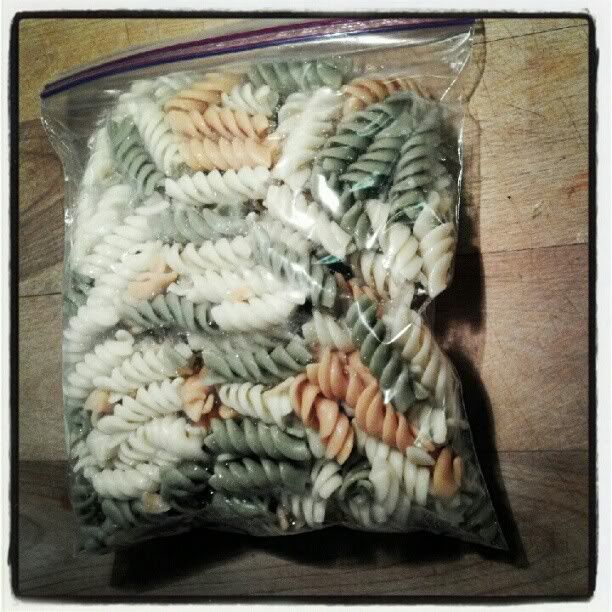 Here's a great time-saving tip for pasta for salads & packed lunches. A full pound of pasta makes far too much pasta salad for my family of three, but when I cook the pasta I cook the entire pound. I pour the pasta into a colander and rinse with cold water until the pasta is room temp then I make half of the pasta into salad. The second half I store in a zip-lock bag in the refrigerator. The pasta keeps in the fridge this way for a week or more. This enables me to make a quick pasta salad, a different flavor if desired, later in the week or the following weekend.
I've also found having cooked pasta in the fridge terribly handy for packed lunches. You can quickly mix up a single serving of pasta with salad dressing, or some frozen veggies and diced cold cuts, or make a quick homemade mac & cheese by whipping up a cream sauce in a skillet with a bit of cream and shredded cheese.
Pasta Mix-in Ideas - Mix and match:
salad dressing (creamy or vinegar based)
shredded (or cubed) cheese (consider Parmesan)
diced or finely sliced cold cuts (salami & ham are favorites)
frozen/canned corn
frozen green peas
grated carrots
snap peas
halved grape tomtoes
fresh herbs such as basil
cubed avocado
cheese sauce
Monday, June 18, 2012
Meal Plan Monday
This week I've planned meals for specific days as dictated by use-by dates of the meat I purchased & which nights I have very little cooking time. Tuesday I will pre-cook the taco items that need cooking & heat them up when we return home from appointments.


Five Spice Chicken recipe
I'm on Menu Plan Monday at http://orgjunkie.com/blog
Five Spice Chicken recipe
I'm on Menu Plan Monday at http://orgjunkie.com/blog
Friday, June 8, 2012
More Meal Planning - WorkFlowy & Recipe Listing
Sometimes I try a new recipe & really like it, then after time passes, I forget which magazine, cookbook or website the recipe is in. So now when I decide to add a recipe to my regular repertoire I add the name & source on my workflowy recipe listing.
Here's how it looks in the collapsed list
Here's how it looks when I open the Recipe bullet on it's own page.
Here's how it looks in the collapsed list
Here's how it looks when I open the Recipe bullet on it's own page.
Friday, June 1, 2012
I'm Making Progress
I've broken my goal into small increments so I can focus on the daily progress & I'm making progress.
(at the time of original posting this showed that I had lost 5 pounds)

Created by MyFitnessPal - Free Weight Loss Tools
Monday, May 21, 2012
Menu Plan Monday & My Meal Planning Process
I have a new meal planning process that I thought I would share.
I don't assign meals to specific days of the week. I choose a few meals that I'll make during the week, this leaves me wiggle room. Since my husband seldom eats dinner at home, I end up with leftovers & plan fewer meals. This way I'm planning for what is likely to happen & I don't end up having to toss food that's past it's expiration date.
I've recently begun using the website http://www.workflowy.com for organization. I've integrated it into my meal planning.
This week I began with leftover meat in my fridge (sale meat for which I had no specific plan when I bought it.) I listed the meat including the sell by or use by date so that I could easily remember what I had without having to go look in the meat bin of my refrigerator. I also have a link to my grocery list so that I can get there quickly. I mark each meal as completed as I make it (I liked to see items crossed off the list.) The next week when I make a new plan, I delete them. With Workflowy you can choose if you want to display or hide completed items.

This week I have leftover turkey sausage & chicken breasts so I set about meal planning based on those items. I've added the recipes I will make with each dish & where to find them.
******(Update I no longer use this app or website, it stopped working, it wouldn't sync and started saying certain items like onions were already on my list and simply would not add them!)********
While I was building my meal plan I also have a tab open at http://www.groceryiq.com - This the grocery/shopping list app that I use on my phone. I love it because it's available for Android, iPhone (& iPad), Blackberry & as a website. I have it on my phone (android), my iPad & iPod Touch, and I've shared my list with my husband who has the app on his Blackberry. I can add to my grocery list no matter what device I have in my hand when I think of items to add, and it will be synced to all my devices. I can also send my list to an email address or print it from the website. Grocery IQ has a barcode scanner, so when I run out of a pantry staple I scan the empty box using my phone camera - and it adds that item to my grocery list. I've also found it's handy if my husband goes to the store because he may not know which type of Ritz crackers I buy, but if I've scanned the item it lists specifics and usually shows a picture.


So I've added to my grocery list & will take my phone with me to the market when I go shopping. I used to use a paper list, but I was often losing it, or forgetting to take it with me, thinking of items to add to it while I was at the doctor's office, or leaving it sitting on the seat in the car, in the parking lot of the supermarket. Keeping my grocery list on my phone has been a great solution for me.
This week I chose 1 cookbook - The Pioneer Woman Cooks by Ree Drummond, and a stack of 3 magazines. I knew what my meats were so I looked through the indexes (I love magazines with a recipe index in the back!) for recipes that used those items. When I wasn't finding anything for boneless skinless chicken breasts that tickled my fancy & went well with the potatoes I wanted to make, I searched for chicken recipes on http://www.cookscountry.com a site with which I have a paid membership. The quality of the recipes on this site make it worthwhile (to me) to pay a membership to have access to their full history of recipes (I believe that access to recipes from the current season of their program is free.) I don't like to waste my time with recipes that turn out to be no good and I find that sites with user submitted recipes have a large percentage of those. I guess I'm picky.

I'm on Menu Plan Monday at http://orgjunkie.com/blog
I don't assign meals to specific days of the week. I choose a few meals that I'll make during the week, this leaves me wiggle room. Since my husband seldom eats dinner at home, I end up with leftovers & plan fewer meals. This way I'm planning for what is likely to happen & I don't end up having to toss food that's past it's expiration date.
I've recently begun using the website http://www.workflowy.com for organization. I've integrated it into my meal planning.
This week I began with leftover meat in my fridge (sale meat for which I had no specific plan when I bought it.) I listed the meat including the sell by or use by date so that I could easily remember what I had without having to go look in the meat bin of my refrigerator. I also have a link to my grocery list so that I can get there quickly. I mark each meal as completed as I make it (I liked to see items crossed off the list.) The next week when I make a new plan, I delete them. With Workflowy you can choose if you want to display or hide completed items.
This week I have leftover turkey sausage & chicken breasts so I set about meal planning based on those items. I've added the recipes I will make with each dish & where to find them.
******(Update I no longer use this app or website, it stopped working, it wouldn't sync and started saying certain items like onions were already on my list and simply would not add them!)********
While I was building my meal plan I also have a tab open at http://www.groceryiq.com - This the grocery/shopping list app that I use on my phone. I love it because it's available for Android, iPhone (& iPad), Blackberry & as a website. I have it on my phone (android), my iPad & iPod Touch, and I've shared my list with my husband who has the app on his Blackberry. I can add to my grocery list no matter what device I have in my hand when I think of items to add, and it will be synced to all my devices. I can also send my list to an email address or print it from the website. Grocery IQ has a barcode scanner, so when I run out of a pantry staple I scan the empty box using my phone camera - and it adds that item to my grocery list. I've also found it's handy if my husband goes to the store because he may not know which type of Ritz crackers I buy, but if I've scanned the item it lists specifics and usually shows a picture.
So I've added to my grocery list & will take my phone with me to the market when I go shopping. I used to use a paper list, but I was often losing it, or forgetting to take it with me, thinking of items to add to it while I was at the doctor's office, or leaving it sitting on the seat in the car, in the parking lot of the supermarket. Keeping my grocery list on my phone has been a great solution for me.
This week I chose 1 cookbook - The Pioneer Woman Cooks by Ree Drummond, and a stack of 3 magazines. I knew what my meats were so I looked through the indexes (I love magazines with a recipe index in the back!) for recipes that used those items. When I wasn't finding anything for boneless skinless chicken breasts that tickled my fancy & went well with the potatoes I wanted to make, I searched for chicken recipes on http://www.cookscountry.com a site with which I have a paid membership. The quality of the recipes on this site make it worthwhile (to me) to pay a membership to have access to their full history of recipes (I believe that access to recipes from the current season of their program is free.) I don't like to waste my time with recipes that turn out to be no good and I find that sites with user submitted recipes have a large percentage of those. I guess I'm picky.
I'm on Menu Plan Monday at http://orgjunkie.com/blog
Subscribe to:
Posts (Atom)


 Posts
Posts


