Pages

Showing posts with label DROID. Show all posts

Monday, May 21, 2012

Menu Plan Monday & My Meal Planning Process

I have a new meal planning process that I thought I would share.

I don't assign meals to specific days of the week. I choose a few meals that I'll make during the week, this leaves me wiggle room. Since my husband seldom eats dinner at home, I end up with leftovers & plan fewer meals. This way I'm planning for what is likely to happen & I don't end up having to toss food that's past it's expiration date.

I've recently begun using the website http://www.workflowy.com for organization. I've integrated it into my meal planning.

This week I began with leftover meat in  my fridge (sale meat for which I had no specific plan when I bought it.)  I listed the meat including the sell by or use by date so that I could easily remember what I had without having to go look in the meat bin of my refrigerator. I also have a link to my grocery list so that I can get there quickly. I mark each meal as completed as I make it (I liked to see items crossed off the list.) The next week when I make a new plan, I delete them. With Workflowy you can choose if you want to display or hide completed items.

Screen Shot 2012-05-21 at 10.19.19 AM

This week I have leftover turkey sausage & chicken breasts so I set about meal planning based on those items.  I've added the recipes I will make with each dish & where to find them.

******(Update I no longer use this app or website, it stopped working, it wouldn't sync and started saying certain items like onions were already on my list and simply would not add them!)********
While I was building my meal plan I also have a tab open at http://www.groceryiq.com - This the grocery/shopping list app that I use on my phone. I love it because it's available for Android, iPhone (& iPad), Blackberry & as a website. I have it on my phone (android), my iPad & iPod Touch, and I've shared my list with my husband who has the app on his Blackberry. I can add to my grocery list no matter what device I have in my hand when I think of items to add, and it will be synced to all my devices. I can also send my list to an email address or print it from the website. Grocery IQ has a barcode scanner, so when I run out of a pantry staple I scan the empty box using my phone camera - and it adds that item to my grocery list. I've also found it's handy if my husband goes to the store because he may not know which type of Ritz crackers I buy, but if I've scanned the item it lists specifics and usually shows a picture.
Screen Shot 2012-05-21 at 10.22.46 AM
Screen Shot 2012-05-21 at 10.22.20 AM
So I've added to my grocery list & will take my phone with me to the market when I go shopping. I used to use a paper list, but I was often losing it, or forgetting to take it with me, thinking of items to add to it while I was at the doctor's office, or leaving it sitting on the seat in the car, in the parking lot of the supermarket. Keeping my grocery list on my phone has been a great solution for me.

This week I chose 1 cookbook - The Pioneer Woman Cooks by Ree Drummond, and a stack of 3 magazines. I knew what my meats were so I looked through the indexes (I love magazines with a recipe index in the back!) for recipes that used those items. When I wasn't finding anything for boneless skinless chicken breasts that tickled my fancy & went well with the potatoes I wanted to make, I searched for chicken recipes on http://www.cookscountry.com a site with which I have a paid membership. The quality of the recipes on this site make it worthwhile (to me) to pay a membership to have access to their full history of recipes (I believe that access to recipes from the current season of their program is free.)  I don't like to waste my time with recipes that turn out to be no good and I find that sites with user submitted recipes have a large percentage of those. I guess I'm picky.
Screen Shot 2012-05-21 at 10.54.52 AM
I'm on Menu Plan Monday at http://orgjunkie.com/blog

Wednesday, August 17, 2011

A Tale of Two Camera Phones

Last week I got a much anticipated new phone. I love my original Motorola Droid so much that I got a Droid 3. I love it, I'm in phone heaven. It can do so many cool new things my own phone couldn't, with one glaring exception. It takes horrible photos.

Any insight on a fix for this would be much appreciated, but I think I'm just out of luck on this particular issue :(
Original Droid Photos on Left - Droid 3 photos on the right.
Poppy Seed CasserolePoppy Seed Casserole
Poppy Seed Casserole2011-08-17_18-13-56_902
Poppy Seed Casserole2011-08-17_18-17-09_982
Poppy Seed Casserole2011-08-17_18-28-18_676
It's like the new phone everything has a pink, or beige tone to it. Some photos come out looking as if they were taking in sepia. I'm so sad, my old phone took such wonderful photos and was so good at capturing color.

Monday, April 5, 2010

Telling My Story: The Introduction

This morning after a busy holiday weekend I waved my kiddo off to school, walked back to my kitchen and where I usually would brew myself a cup of coffee.... I encountered a sink full of dishes and counter tops that I could barely see. This is in part because my husband "helped" with the cooking this weekend.

The electric griddle was sitting on top of a mega-pack of paper towel rolls on the kitchen floor. His giant monster juice machine was crowding out the toaster. I really just wanted to sit down with my coffee rather than scale what felt like my very own dirty dish k2. Yet I knew that those sticky stacks were high enough for me to see from the kitchen table. If I didn't tackle that thing, before breakfast, I would only end up with indigestion.

I put on my purple dish gloves, grabbed a sponge & got to work feeling very much like a drudge. But then I remembered that I have a number of wonderful & entertaining podcasts that auto-update on my phone. I grabbed my DROID and decided that an episode of Paperclipping Roundtable was precisely what was called for. I love a good podcast! I was focused on the conversation, my mind had something to play with, something to turn upon, but all the while my hands were busy chipping away at a breakfast bowl tower of Pisa, and a dinner dish tower of Babel.

At a certain point I looked around & found the mountain had been brought low. I had finished the dishes & I had podcast time to spare. On to breakfast! I was listening to Paperclipping Roundtable 013 Taking It Beyond the Page. They were talking about art journaling, about blogs, and quilting and collage and all sorts of mixed media things that can tie in with scrapbooking and also about how each lady in the panel found her way into scrapbooking. It struck me that the unifying thread in each woman's experience had been the desire to tell a story. I think I tell stories on my blog, but that is an area where my scrapbook pages are lacking. This is due in part to scrapping photos several years after the fact and is one of the reasons I have recently begun taking so many online scrapbook classes. I am a storyteller & I want that to be reflected in my scrapbooks.

The conversation moved on to where many of these different art forms began, how old they are and at what point they began to blend their edges with scrapbooking. One panelist talked about how plain scrapbooking was in the beginning and how she realized what she was doing was not an expression of her. It made me think of my own scrapbook beginnings and all the Scrapbooking booths I approached at craft fairs, full of a desire to fill up albums with darling photos of my newborn. How as the consultant talked with someone else, I would page through her albums, how turned off I was by them, and how I would try to slink away without talking to anyone. I had no desire to do THAT to my precious photos.

So this is going to be a self-indulgent series. I want talk about how I started scrapbooking, how it was in my blood, somehow, long before was a Mom or realized what I was doing and where it has led. This figures quite well I think, with my One Little Word for 2010: Purpose. By looking at how I have come to this place, I can be more intentional about where I am going. I can set my course and (as the cook in me desires to call it) plan my meals.

(It amazes the HECK out of me that even at this point the words scrapbooking and journaling are not in spell checkers - please get with it dictionary builders! - And by-the-way why do Spell-checks not check Subject lines & Titles - they are PRETTY important too! - Exclamation points galore, run-on-sentences and strong feelings, today.)

Tuesday, December 15, 2009

Cricut Cookies

Leave it to a scrapbooker to figure out how to use papercraft tech on Christmas cookies! I'm going to have to try this with my Cricut and my Nana's prize sugar cookie recipe!

Brilliant idea Erin!
Head on over to Erin's Blog Procrastination Station to see how she did it. http://erinlincoln.blogspot.com/2009/12/sugar-cookie-how-to.html

P.S. This is my first time blogging from the car rider line at school. I love my new DROID phone <3 (of course now that I am home I had to add a picture to really let you know what you're missing over at Procrastination Station.) And thanks to Julie Johnson over at Just Our Story for the heads up!

Friday, December 11, 2009

I Got a DROID - Apps

last updated 10:45 Wed. June 30, 2010


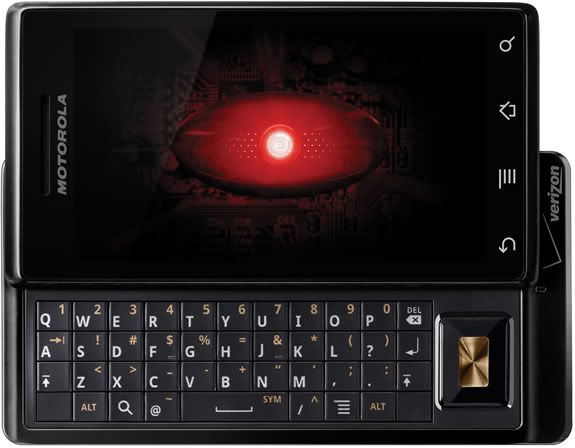
I got one of those new DROID phones and I loved it immediately. I got it on November 7 so I have had it for awhile and the longer I have it the MORE I love it.

I had a Palm Treo previously (It was a 3 year old model) and I hated it - it was the stupidest smart phone ever. It didn't have basic functions that I had on basic phones in the past... but I also didn't get the Internet hooked up to it. So the DROID is my first Internet surfing, emailing - all around phone.

I feel like I have a computer in my pocket, I'd say I spend less than HALF the time I used to on my laptop. Motorola DROID is on Verizon and uses the Android Operating System (developed by Google) I'm not going to be a DROID commercial... but I have wished I could find a resource for recommendations of applications to use on my DROID so in hopes other bloggers will begin to do the same, I am going to list the apps that I like and use....

Apps I Use


Pandora - Internet Radio
A streaming custom radio station - how did I not know about this, before?! I haven't bothered loading any music on my phone because Pandora is so great and so EASY to use! Robert has satellite radio in his car & he gets a little annoyed that I would rather listen to Pandora over the car stereo (linked thru the headphone jack) than his fancy satellite radio. You can also use Pandora on your PC http://www.pandora.com/


update 12/22/09
I like Shazam for helping me identify and tag songs that I hear when I am out and about (or on TV.)


BeyondPod
BeyondPod is an app for listening to podcasts. I set up the podcast subscriptions right on my phone and Beyond Pod can pull direct to my phone right thru the Internet. It's set me free from iTunes sync bondage (and also freed me from having to wear headphones!) I tried a few different apps for this (including Google Listen) before settling on BeyondPod. Ultimately it came down to a few podcasts I listen to which require a user password for access to the feed and Beyond Pod has the ability to handle that in the setup. It also pauses the podcast when I have an incoming call. BeyondPod can also sync with Google Reader, but at present I have only used it for podcasts. This is the only paid app I have right now.There is a free version but I bought the unlock code for the full app on Black Friday when it was half price.

Ustream Viewer Beta
I just loaded this today and it WORKS! Yay now I can take my ustream live shows with me! Search for the show name instead of putting in the website address. It stops the stream (doesn't close the app) if you try to do another task that takes you away from the screen, or if you put the screen to sleep. I'm not sure if its meant to work this way because it needs the resources to run, or if this is because its Beta.

Barcode Scanner
Incredible app uses camera to scan barcode & gives you comparison prices on several websites also can use to search some books will give page # of content you searched for - has been wonderfully handy for Christmas Shopping --while in Target - Ooo! Walmart has this for $5 cheaper!

Update 1/4/10


Seesmic
Today I tried out Seesmic a Twitter app that also has a desktop Twitter Client that is well spoken of. I LOVED it. It has a wonderful interface and I could do things with lists and profiles, and search for users so much better, even better than the desktop Twitter Client I currently use (TweetDeck.) I'm still using Twidroid for day-to-day tweeting because Seesmic does not yet have the ability to remember my place with the last tweet I read... this feature is supposed to be coming soon- when it does I expect to switch over completely. I didn't uninstall Seesmic because I will still use it for lists & the user searches. Here is an article that does a wonderful job of describing all the features complete with screen shots. http://blog.appboy.com/2009/12/seesmic-finally-makes-twitter-usable-on-android/
Would it make you discount my opinions if I say that I'd so much rather look at Seesmic's cute Icon than Twidroid's ugly one?


Update 12/22/09
Twidroid
I'm now using the free version of Twidroid instead of ITweet because it allows me to view lists. It also has a "conversation" option on Tweets which shows me a threaded conversation. This is real handy when sometimes I can not figure out which tweet someone was responding to! I think I prefer this to Tweet Deck because of this feature! I wish they had a desktop version!
http://twidroid.com/features/

ITweet! (see note above about Twidroid & Seesmic)
The twitter app I'm using it works well enough. It allows me to see my full feed, just my tweets, just replies, just sent direct message, just saved direct messages.... I liked this app as I wanted to be sure to see @replies and direct messages as I follow a lot of people

Facebook
came loaded on the phone

Update 12/23/09
Fandango
- I think this is a recent release... Fandango showed me which show times of Avatar were playing in 3D and which were on IMAX - the Flixter app below did NOT show me that and we ended up seeing it in a normal (not even 3d theatre.)

Movies by Flixter (see notes above in Fandango)
Find local movie times, read reviews, watch trailers. Also section for Coming Soon & DVD. Trailers are great for entertaining my child in restaurants.

Yelp
for finding restaurants & businesses in your vicinity - I like this better than "Where"

Star Wars Sounds and Ringtones
Like a soundboard, fun to play with - could occupy my 11-year-old all day long

Google Sky Map
Fun to play with hold it up and move it around, screen displays star chart based on phone location so you can identify stars, planets etc... Have also used it to find the moon during the day. Also displays stars you can't see because they are below the Horizon.

The Weather Channel
See current weather conditions option to add several locations - see current, 36 hour and 10 day forecast - I used this to monitor the snow forecasts for flight day and on my trip to Oklahoma City. It was very handy!

Note pad
Would like to find a better one, if screen times out before I back out... it won't save edits - very annoying as I keep grocery list on my phone!

Evernote
I have this one installed but so far it hasn't worked for any of the things I wanted to do from my phone (I couldn't edit my grocery list on my phone to mark off stuff as I shopped. And I couldn't save a web page that I wanted to go back to later.) I'm new to Evernote... so perhaps I'll figure out some things its good for... my Twitter friends rave that its wonderful, just seems like the mobile version can't do any of the things I want it to do.

SuperYatzy
Addicting. You can play 2 player with a friend or play against the phone

WordUp!
A word scramble game

Word Search
Word search game

Tetrads
Tetris type game.

Apps I want to see developed for Android: (so I can use them)

Update 6/30/10 Kindle for Android released today!!!!! I have it loaded, and plan to play with it while I eat breakfast!

Kindle for Android
My greatest wish is for a KINDLE app that will allow me to read my Kindle books on my phone. I really hope that Google's association with the Barnes & Noble Nook is not going to get in the way of Android having an Amazon Kindle app. I own a Kindle, I love it - I'd love to be able to access the Kindle Content I own, from my phone.
Kindle for PC is available Now: http://www.amazon.com/gp/feature.html/ref=kcp_pc_mkt_lnd?docId=1000426311


Tweet Deck for Android (no longer wishing for this see Twidroid & Seesmic above)
My 2nd greatest wish is for a better Twitter App. If Tweet Deck would come out with an app for android that would remember which tweets I have already marked as seen and cleared from my desktop - that would be WONDERFUL. I'd settle for an Android Twitter app that would allow me to make columns or groups so that when I'm busy I can just view updates of my best friends... at this point I am sometimes missing them in the crowd.
Tweet Deck for PC Now: http://www.tweetdeck.com/features/index.html


Update 6/30/10 This app is now available in the Android Market. It is $29.99 and I plan to get it! (but due to some home network internet issues, I need to reconfigure my Sling box - as soon as I have it set up again I will be getting this app!)

Slingbox for Android
We have a slingbox. It's hooked up to our home DVR/cable box. Basically a slingbox makes it so that I can watch my home TV content over the Internet. I can watch shows recorded on the DVR, I can watch live TV, I can even watch programs on demand. This makes Robert a rock star when he is watching... say, the NBA finals on his laptop in the airport. It's very cool for a business traveler... and it would be very cool for a Mom stuck in traffic to hand off on her phone to an antsy child in the back seat.