last updated 10:45 Wed. June 30, 2010

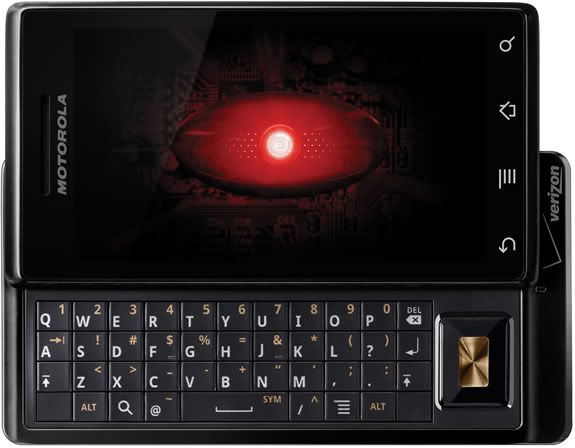
I got one of those new DROID phones and I loved it immediately. I got it on November 7 so I have had it for awhile and the longer I have it the MORE I love it.

I had a Palm Treo previously (It was a 3 year old model) and I hated it - it was the stupidest smart phone ever. It didn't have basic functions that I had on basic phones in the past... but I also didn't get the Internet hooked up to it. So the DROID is my first Internet surfing, emailing - all around phone.
I feel like I have a computer in my pocket, I'd say I spend less than HALF the time I used to on my laptop. Motorola DROID is on Verizon and uses the Android Operating System (developed by Google) I'm not going to be a DROID commercial... but I have wished I could find a resource for recommendations of applications to use on my DROID so in hopes other bloggers will begin to do the same, I am going to list the apps that I like and use....
Apps I Use Pandora - Internet Radio
A streaming custom radio station - how did I not know about this, before?! I haven't bothered loading any music on my phone because Pandora is so great and so EASY to use! Robert has satellite radio in his car & he gets a little annoyed that I would rather listen to Pandora over the car stereo (linked thru the headphone jack) than his fancy satellite radio. You can also use Pandora on your PC
http://www.pandora.com/ update 12/22/09
I like Shazam for helping me identify and tag songs that I hear when I am out and about (or on TV.)

BeyondPod
BeyondPod is an app for listening to podcasts. I set up the podcast subscriptions right on my phone and Beyond Pod can pull direct to my phone right thru the Internet. It's set me free from iTunes sync bondage (and also freed me from having to wear headphones!) I tried a few different apps for this (including Google Listen) before settling on BeyondPod. Ultimately it came down to a few podcasts I listen to which require a user password for access to the feed and Beyond Pod has the ability to handle that in the setup. It also pauses the podcast when I have an incoming call. BeyondPod can also sync with Google Reader, but at present I have only used it for podcasts. This is the only paid app I have right now.There is a free version but I bought the unlock code for the full app on Black Friday when it was half price.
Ustream Viewer Beta
I just loaded this today and it WORKS! Yay now I can take my ustream live shows with me! Search for the show name instead of putting in the website address. It stops the stream (doesn't close the app) if you try to do another task that takes you away from the screen, or if you put the screen to sleep. I'm not sure if its meant to work this way because it needs the resources to run, or if this is because its Beta.
Barcode Scanner
Incredible app uses camera to scan barcode & gives you comparison prices on several websites also can use to search some books will give page # of content you searched for - has been wonderfully handy for Christmas Shopping --while in Target - Ooo! Walmart has this for $5 cheaper!
Update 1/4/10 
Seesmic
Today I tried out Seesmic a Twitter app that also has a desktop Twitter Client that is well spoken of. I LOVED it. It has a wonderful interface and I could do things with lists and profiles, and search for users so much better, even better than the desktop Twitter Client I currently use (TweetDeck.) I'm still using Twidroid for day-to-day tweeting because Seesmic does not yet have the ability to remember my place with the last tweet I read... this feature is supposed to be coming soon- when it does I expect to switch over completely. I didn't uninstall Seesmic because I will still use it for lists & the user searches. Here is an article that does a wonderful job of describing all the features complete with screen shots. http://blog.appboy.com/2009/12/seesmic-finally-makes-twitter-usable-on-android/
Would it make you discount my opinions if I say that I'd so much rather look at Seesmic's cute Icon than Twidroid's ugly one?

Update 12/22/09
Twidroid
I'm now using the free version of Twidroid instead of ITweet because it allows me to view lists. It also has a "conversation" option on Tweets which shows me a threaded conversation. This is real handy when sometimes I can not figure out which tweet someone was responding to! I think I prefer this to Tweet Deck because of this feature! I wish they had a desktop version!
http://twidroid.com/features/
ITweet! (see note above about Twidroid & Seesmic)
The twitter app I'm using it works well enough. It allows me to see my full feed, just my tweets, just replies, just sent direct message, just saved direct messages.... I liked this app as I wanted to be sure to see @replies and direct messages as I follow a lot of people
Facebook
came loaded on the phone
Update 12/23/09
Fandango - I think this is a recent release... Fandango showed me which show times of Avatar were playing in 3D and which were on IMAX - the Flixter app below did NOT show me that and we ended up seeing it in a normal (not even 3d theatre.)
Movies by Flixter (see notes above in Fandango)
Find local movie times, read reviews, watch trailers. Also section for Coming Soon & DVD. Trailers are great for entertaining my child in restaurants.
Yelp
for finding restaurants & businesses in your vicinity - I like this better than "Where"
Star Wars Sounds and Ringtones
Like a soundboard, fun to play with - could occupy my 11-year-old all day long
Google Sky Map
Fun to play with hold it up and move it around, screen displays star chart based on phone location so you can identify stars, planets etc... Have also used it to find the moon during the day. Also displays stars you can't see because they are below the Horizon.
The Weather Channel
See current weather conditions option to add several locations - see current, 36 hour and 10 day forecast - I used this to monitor the snow forecasts for flight day and on my trip to Oklahoma City. It was very handy!
Note pad
Would like to find a better one, if screen times out before I back out... it won't save edits - very annoying as I keep grocery list on my phone!
Evernote
I have this one installed but so far it hasn't worked for any of the things I wanted to do from my phone (I couldn't edit my grocery list on my phone to mark off stuff as I shopped. And I couldn't save a web page that I wanted to go back to later.) I'm new to Evernote... so perhaps I'll figure out some things its good for... my Twitter friends rave that its wonderful, just seems like the mobile version can't do any of the things I want it to do.
SuperYatzy
Addicting. You can play 2 player with a friend or play against the phone
WordUp!
A word scramble game
Word Search
Word search game
Tetrads
Tetris type game.
Apps I want to see developed for Android: (so I can use them)

Update 6/30/10 Kindle for Android released today!!!!! I have it loaded, and plan to play with it while I eat breakfast!
Kindle for Android
My greatest wish is for a KINDLE app that will allow me to read my Kindle books on my phone. I really hope that Google's association with the Barnes & Noble Nook is not going to get in the way of Android having an Amazon Kindle app. I own a Kindle, I love it - I'd love to be able to access the Kindle Content I own, from my phone.
Kindle for PC is available Now: http://www.amazon.com/gp/feature.html/ref=kcp_pc_mkt_lnd?docId=1000426311

Tweet Deck for Android (no longer wishing for this see Twidroid & Seesmic above)
My 2nd greatest wish is for a better Twitter App. If Tweet Deck would come out with an app for android that would remember which tweets I have already marked as seen and cleared from my desktop - that would be WONDERFUL. I'd settle for an Android Twitter app that would allow me to make columns or groups so that when I'm busy I can just view updates of my best friends... at this point I am sometimes missing them in the crowd.
Tweet Deck for PC Now:
http://www.tweetdeck.com/features/index.html Update 6/30/10 This app is now available in the Android Market. It is $29.99 and I plan to get it! (but due to some home network internet issues, I need to reconfigure my Sling box - as soon as I have it set up again I will be getting this app!)
Slingbox for AndroidWe have a slingbox. It's hooked up to our home DVR/cable box. Basically a slingbox makes it so that I can watch my home TV content over the Internet. I can watch shows recorded on the DVR, I can watch live TV, I can even watch programs on demand. This makes Robert a rock star when he is watching... say, the NBA finals on his laptop in the airport. It's very cool for a business traveler... and it would be very cool for a Mom stuck in traffic to hand off on her phone to an antsy child in the back seat.




















 Posts
Posts


